¶ CIP Page
Purpose: Hierarchical view of all portfolios, projects, and tasks with quick actions. Accessible to Admins only.
The table shows three levels in a collapsible tree structure:
- Portfolios (top level) - marked with 📁 folder icon
- Projects (middle level) - nested under portfolios
- Tasks (bottom level) - nested under projects
Table Columns:
- Name: Item name with expand/collapse arrows
- Status: Current status (for projects and tasks only)
- Owner(s): People assigned as owners
- Start Date: When the item begins
- Due Date: When the item is due
- Tags: Labels applied to the item
- Actions: Buttons for edit, duplicate, and delete operations
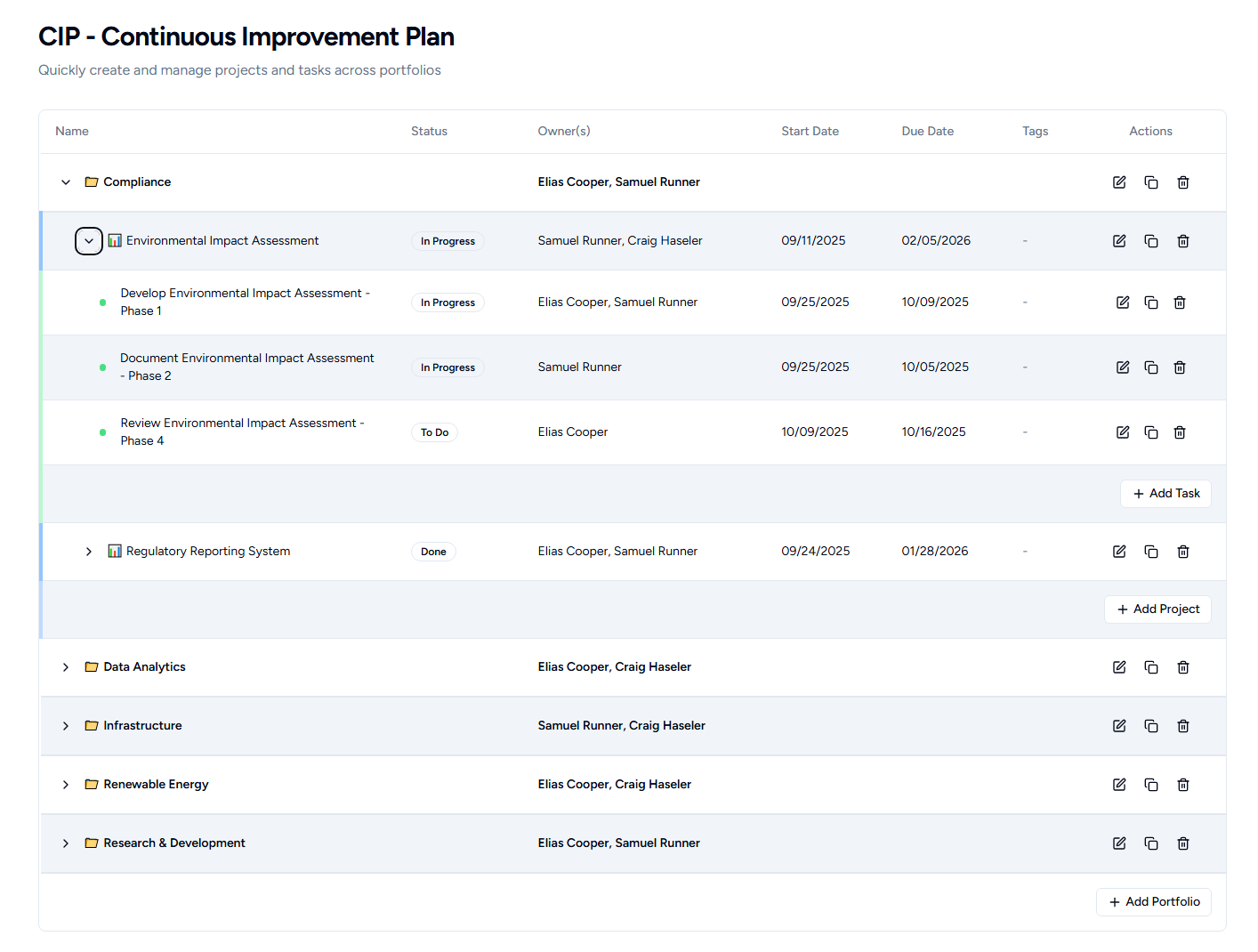
Portfolio Level Actions
Click the arrow to expand/collapse projects within a portfolio.
Action buttons for each portfolio:
- Edit: Opens portfolio edit window
- Duplicate: Creates a copy of the portfolio with all its projects and tasks
- Delete: Permanently removes the portfolio (asks for confirmation)
- Add Project: Plus button to create a new project within this portfolio
Project Level Actions
Click the arrow to expand/collapse tasks within a project.
Action buttons for each project:
- Edit: Opens project edit window
- Duplicate: Creates a copy within the same portfolio
- Duplicate To: Copy to a different portfolio (opens selection dialog)
- Delete: Permanently removes the project (asks for confirmation)
- Add Task: Plus button to create a new task within this project
Task Level Actions
Action buttons for each task:
- Edit: Opens task edit window
- Duplicate: Creates a copy within the same project
- Duplicate To: Copy to a different project (opens selection dialog)
- Delete: Permanently removes the task (asks for confirmation)
New Task Default: Tasks created from the CIP page automatically get tagged with "CIP"
Duplicate To Dialog
When duplicating a project or task to a different container:
- Select destination portfolio (for projects)
- Select destination project (for tasks)
- Confirm to complete the duplication
- Cancel to abort
Key Features:
- Collapse/expand any level to focus on what you need
- All actions happen inline without leaving the page
- Loading spinners show when duplicating or deleting items
- Success messages appear after completing actions
- Changes reflect immediately in the table
- Sorted alphabetically by name at each level